




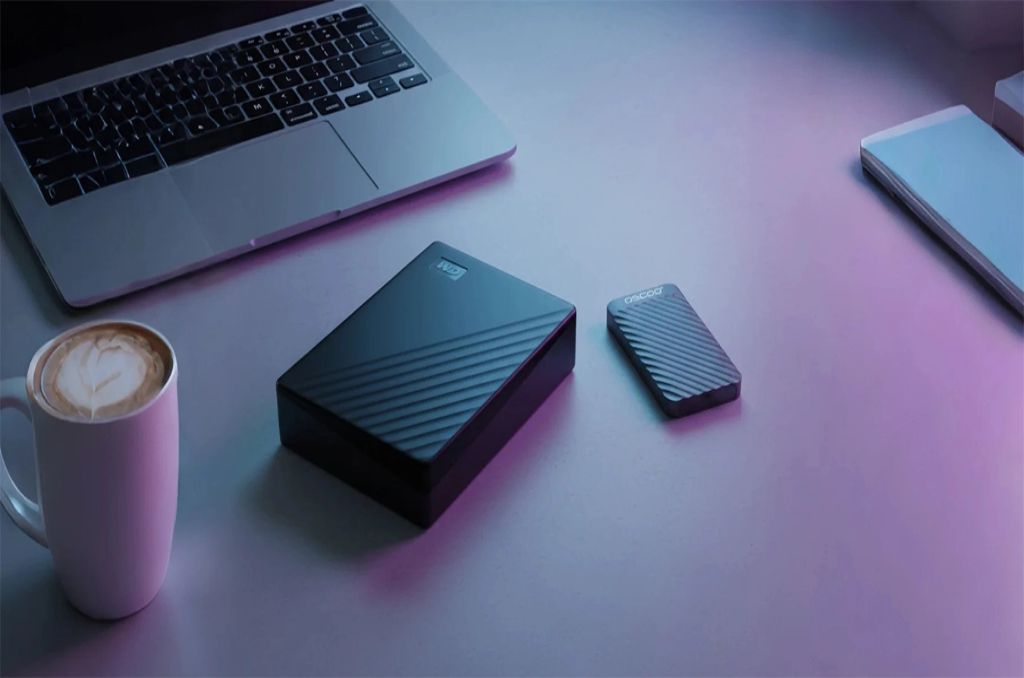
When comparing the portable SSD price to a traditional hard drive, you are choosing between modern speed and old school space.
A Solid State Drive (SSD) uses flash memory to save files instantly, making it perfect for gaming or moving big videos.
A Hard Disk Drive (HDD) uses spinning platters, which makes it cheaper for storing massive amounts of data that you do not need to open every single day.
If you want speed and toughness, get an SSD. If you need a digital attic for thousands of photos at a low cost, the HDD is still the king of value.
What Is the Main Difference Between an SSD and an HDD?
The biggest difference is how they move. An SSD is like a tablet or a phone with no moving parts inside, while an HDD is like an old record player with a spinning disc and a tiny arm that reads data.
Think of it like a library. An SSD is like having a magic book that opens to the right page the moment you think about it.
An HDD is like a giant library where a robot has to physically run down an aisle, climb a ladder, and grab a book for you.
Because the robot has to move, it takes longer. Because the SSD has no moving parts, it is much faster and does not break as easily if you drop it.
Why Speed Matters for Your Daily Tasks
An SSD can move files up to ten or twenty times faster than a standard hard drive, which means you spend less time waiting and more time playing or working.
When you plug in a drive to move a movie, an HDD might take five minutes to finish the job. An SSD might do it in thirty seconds.
This speed happens because the SSD uses electricity to send data through chips.
According to reports from storage experts at Backblaze, traditional hard drives have a mechanical failure rate that can increase as they get older because those spinning parts eventually wear out.
Using an SSD removes that mechanical worry and keeps your computer running smoothly.
Speed Comparison at a Glance
Speed is measured by how much data a drive can read or write in one second.
- External HDD: Usually moves data at about 120 MB per second.
- Portable SSD: Can move data at 500 MB to over 2,000 MB per second.
Durability and Why It Protects Your Memories
Portable SSDs are much tougher than HDDs because they do not have fragile glass or metal disks inside that can shatter or scratch.
If you carry your storage in a backpack, durability is very important. If you drop a running HDD, the little reading arm can crash into the spinning disk. This is called a head crash, and it usually means your photos and files are gone forever.
Since a portable SSD is just a collection of sturdy chips, it can survive bumps, rattles, and even some drops without losing your data. It is the better choice for students, travelers, and anyone who is a little bit clumsy.
Storage Space and the Cost of Saving Files
Hard drives are much cheaper when you need a lot of room, but the portable SSD price has been coming down every year, making it easier to afford better technology.
If you have five thousand movies and want to keep them all in one place, an HDD is a great deal.
You can get a huge 8TB HDD for the same price as a much smaller 2TB SSD. It is like buying a giant warehouse versus a high speed garage.
If you just need to store things and leave them there for a long time, the warehouse (HDD) is the smart move for your wallet.
Cost and Capacity Table
| Feature | External HDD | Portable SSD |
| Price per Gigabyte | Very Low | Higher |
| Common Sizes | 1TB to 20TB | 500GB to 8TB |
| Best For | Backups and Archives | Active Projects and Gaming |
| Size of Drive | Larger and Heavier | Small and Pocket sized |
Noise and Battery Life
SSDs are completely silent and use less power, while HDDs make a humming sound and can drain your laptop battery faster.
Because an HDD has to spin a heavy disk at thousands of rounds per minute, it uses more battery juice from your laptop.
It also makes a clicking or whirring noise that you can hear in a quiet room. An SSD is silent. If you are working in a library or on an airplane, the SSD is the polite choice. It also helps your laptop stay alive for an extra thirty minutes or more because it is so efficient with power.
Which One Should You Choose?
You should choose a portable SSD if you want speed and safety, but you should choose an HDD if you have a lot of files and a small budget.
Deciding between these two comes down to what you do every day.
If you are a gamer who wants games to load fast, or a photographer who edits big pictures, the SSD will save you hours of frustration.
If you are a parent who just wants to save family videos from the last ten years and put them in a drawer for safety, the HDD is a perfect and affordable choice.
Pick an SSD if:
- You travel often and might bump your bag.
- You want your computer to feel fast and snappy.
- You are editing videos or playing large games.
Pick an HDD if:
- You need to save a massive amount of data for very little money.
- The drive will stay on your desk and never move.
- You are not in a rush to move files back and forth.
Final Thoughts on Modern Storage
The best storage is the one that fits your life and keeps your data safe without costing too much.
While the portable SSD price is higher at the start, many people find it is worth the extra money because it lasts longer and works faster.
However, the old fashioned hard drive is still a wonderful tool for keeping big collections of data safe. No matter which one you pick, remember to always keep a second copy of your most important files in a different place.
Technology can be amazing, but having a backup is the only way to be 100 percent sure your memories are safe.